Light Changes the Palette: Comparing a Familiar Subject
Compare two views of the same subject to see how color decisions describe light, atmosphere and a different moment of attention.
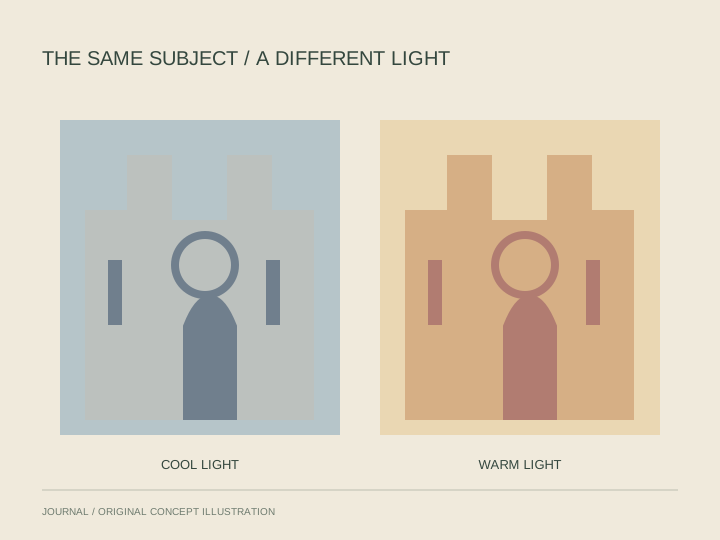
When two paintings show a similar subject, the differences can become easier to see. Instead of beginning with 'Which is more realistic?', ask what each painting asks you to notice about light and color.
Hold the subject steady
Claude Monet's views of Rouen Cathedral offer a useful starting point. The National Gallery of Art's color teaching materials compare versions of the facade with different treatments of light. A repeated architectural subject provides a reference against which the palette can change.
You can use the same approach with two reliable reproductions of a familiar place. Confirm the titles and dates, then write down what is recognizably shared before examining the differences.
Compare small areas first
Choose a feature visible in both images, such as an arch or a patch of shadow. Describe the colors used there. Then ask whether the neighboring area makes that passage seem warmer, cooler, lighter or darker.
Avoid treating a screen reproduction as a precise color sample. Your aim is to compare relationships within the images, not to determine the original paint mixture from a display.
Build a supported description
Step back to compare the overall effect. Which edges appear more distinct? Where does a lighter passage interrupt a darker area? Use those visible differences to support your account of the atmosphere.
End by naming one decision you can point to in each image. A comparison becomes more useful when it moves from a general mood to a specific observation that another viewer can examine.